

Photo proof for chores, approved by you in one tap
In short
Zupzi is a free family chore app with photo proof built in. When a mission asks for a photo, your child takes one with the camera, it lands on your phone, and you approve the mission with one tap. There is nothing to buy, and photos are kept for one month unless you pick another period.
Updated
How does photo proof work in Zupzi?
Photo proof is one step inside a normal Zupzi mission. You decide which missions need a picture; your child does the job, shows it, and, with approval on (the default), the Stars wait for your yes.
- You choose the missions that ask for a photo. Ready-made ones like Make the bed already do. For any other mission, open it and pick With a photo under “How she shows it’s done”.
- Your child opens her mission. She enters her side of the app with her 4-digit PIN, opens the mission and checks off its steps (every ready-made mission has two or three). Read it to me reads them aloud.
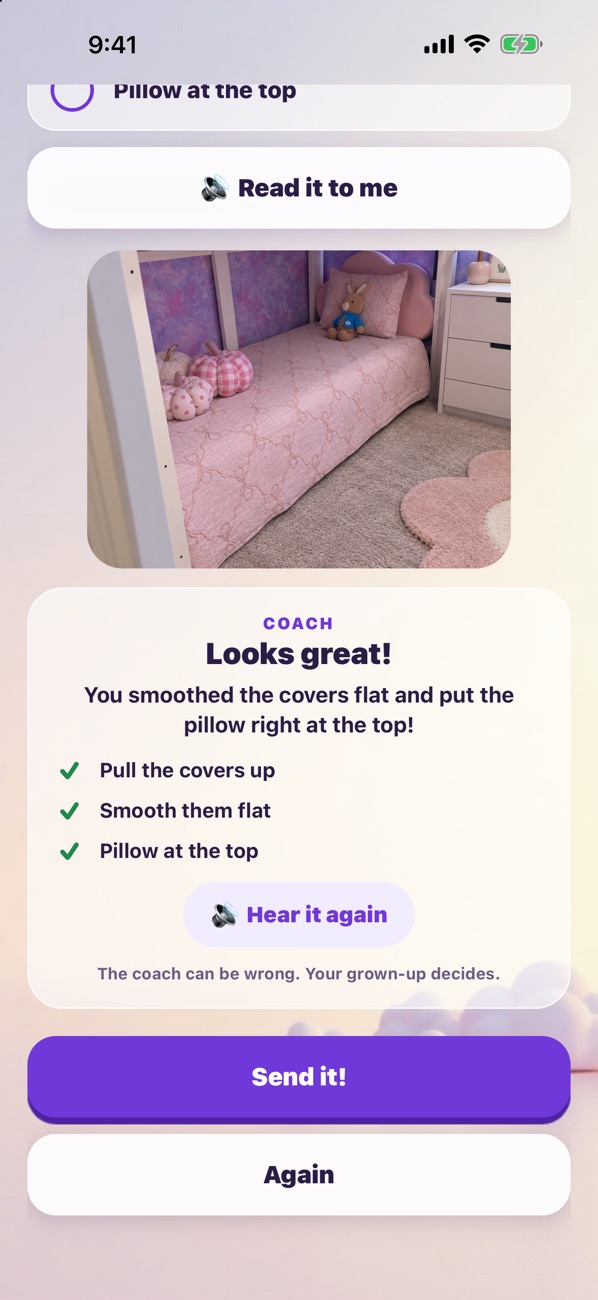
- She takes the picture. She taps Take a photo and the camera opens. If she doesn’t like it, Again takes a new one; Send it! sends it to you.
- You approve with one tap. You get a pop-up on your phone and see the photo. Tap Approve and the mission turns into Stars, or Not this time and no Stars are added.

After she sends it, her screen says the Stars arrive when you say yes. There is a small celebration when a mission is sent and another when you approve it. No internet at that moment? The mission and its photo wait on the device and go out when the connection is back.
Watch both sides, about a minute each: Your kid does her missions and Approve with one tap. What the Stars buy is on Stars and rewards.
Which chores ask for a photo?
Zupzi comes with 26 ready-made missions, and 12 of them ask for a photo from the start: the chores whose steps a picture can actually show, like a made bed or a clear floor. The other 14, such as brushing teeth, homework or walking the dog, don’t ask for one.
| Mission | Group | Stars | How often |
|---|---|---|---|
| Make the bed | Home | 30 | Daily |
| Put away toys | Home | 30 | Daily |
| Tidy your room | Home | 60 | Weekly |
| Set the table | Home | 30 | Daily |
| Tidy the bookshelf | Home | 40 | Weekly |
| Help with the dishes | Home | 40 | Daily |
| Put away laundry | Home | 40 | Weekly |
| Sweep the floor | Home | 40 | Weekly |
| Feed the pet | Pets | 30 | Daily |
| Tidy the pet's bed | Pets | 30 | Weekly |
| Water the plants | Wellness | 30 | Weekly |
| Draw or paint | Creative | 30 | Weekly |
Nothing here is fixed. Any mission, ready-made or your own, can switch between Just tell me and With a photo. A photo mission can also be Photo needed (she can only finish it with a picture) or Photo welcome (she can finish it either way). Your own missions take 1 to 1,000 Stars, daily, weekly or once. See Pick missions, or write your own, and the steps of every mission on Read-aloud missions.
Who sees the photos, and how long are they kept?
You see each photo on your approval screen. Mission photos live in private storage, kept apart for each family, and are only ever shown through short-lived links. Zupzi never shows your child advertising and never sells or shares her information for marketing.
- One month by default. In the Safety Center, “Keep them for” offers one week, one month, three months or one year.
- Then the picture is deleted. Only the record that the mission was done remains.
- Deleting the family account in Settings deletes everything, photos included.
One switch you control sends a photo somewhere else: the photo coach, below. The full picture of what Zupzi keeps is on Safety and privacy and in the episode The Safety Center.
Can my child use an old photo from the camera roll?
No. The mission screen only opens the camera, never the photo library, so the proof is a picture taken when she says she is done. The photo library is used in one place only: on your side, if you choose a photo for your child’s portrait.
What does the AI photo coach do?
The photo coach is off until you turn it on in Settings → Safety Center → “Photo coach”. When it is on, it looks at the photo before your child sends it and answers with a word of encouragement and a tip, spoken aloud. You see its note on your approval screen, marked “AI coach”.
Does photo proof cost extra?
No. Photo proof is part of Zupzi, and Zupzi is free: there is nothing to buy in the app or on this site. The app has no ads and no third-party analytics or tracking software. To see what other chore apps include at no cost, read Free chore apps compared.
Can I try photo proof before my child does?
Yes. See it as she does runs a practice mission on your side, without pairing a device. Tick the steps and take a photo of anything: nothing counts, and unless you turned on the photo coach, no photo goes to the AI service. Watch See it the way your kid does.
What Zupzi doesn't do
- There is no Android version.
- Zupzi runs on iPhone and iPad, on the App Store in the United States and Brazil only.
- Each family can add up to two children.
- The photo coach speaks English only, and it can be wrong. It never decides Stars.
What else do families ask?
Is photo proof free in Zupzi?
Yes. Photo proof is included, and there is nothing to buy in the app or on this site. See Help & FAQ for the rest of what families ask.
Do I have to approve every mission?
Only the ones you want to. Every mission starts with “I approve it before Stars arrive” switched on, so its Stars wait for you: one tap on Approve adds them, and Not this time adds none. You can switch that off for a mission, and then its Stars arrive as soon as she finishes it.
Can I turn off the photo for one mission?
Yes. Open the mission and switch “How she shows it’s done” to Just tell me. Or keep the photo and make it Photo welcome, so she can finish without one.
Can my child pick a picture from the photo library?
No. Mission photos come only from the camera, so each one is taken when she finishes the job.
Where are the photos stored?
In private photo storage run by Supabase in the United States (us-east-1), kept apart for each family and shown only through short-lived links.
How long does Zupzi keep mission photos?
One month, unless you choose one week, three months or one year in the Safety Center. After that the picture is deleted and only the record that the mission was done stays.
Does the AI photo coach decide if the chore is done?
No. The coach only cheers your child on with a tip, it can be wrong, and it is off until you turn it on. It never decides Stars. More on Safety and privacy.
What if there is no internet when she sends the photo?
The mission and its photo wait on her device and are sent when the connection comes back.
Is there an Android version?
No. There is no Android version. Zupzi runs on iPhone and iPad (iOS and iPadOS 16.4 or later).
Zupzi is free on the App Store
iPhone and iPad · United States and Brazil · nothing to buy inside